Rulesets
Rulesets verify that text content complies with specific policies using formal logic. They are the primary verification mechanism in the platform. In the platform, a ruleset is a collection of Rules that each encode one policy requirement as DSAIL Language code. These rules are responsible for checking whether a document is compliant with the underlying policy.
How Rulesets Work
When a ruleset runs against a Document, the platform evaluates each rule independently through a three-stage process:
- Question answering — Each rule defines data extraction questions (called Claims). The platform asks these questions of the document text using an LLM, producing answers that map to DSAIL variables. Questions are asked per ruleset, not per rule: a registry claim named by several rules is asked once and every one of them reads that answer, while a claim written as a bare identifier stays private to its rule and is asked on its own. See One claim, one answer.
- DSAIL evaluation — The answers are fed into the rule's DSAIL code as variable bindings. An SMT solver evaluates whether the formal assertions hold.
- Result determination — Each assertion resolves to one of three outcomes:
- TRUE — The document satisfies this requirement
- FALSE — The document violates this requirement
- UNKNOWN — Insufficient information to determine compliance
This approach separates the hard problem of reading a document (handled by the LLM) from the precise problem of logical evaluation (handled by the solver). The LLM extracts facts; the solver proves compliance. This means verification results are formally provable, not probabilistic.
Key Concept
Unlike purely LLM-based verification, rulesets produce deterministic results for the same inputs. The DSAIL assertions are evaluated by an SMT solver, which means the logic is mathematically rigorous. The only non-deterministic step is the LLM-powered question answering, which can be reviewed and corrected by human analysts when needed.
A Practical Example
Suppose you have a financial disclosure policy that requires companies to report executive compensation. You would create a ruleset with a rule like:
- Rule text: "The document must disclose total executive compensation for the reporting period"
- DSAIL code: An assertion checking that the disclosed compensation is present and above zero
- Questions: "Does the document disclose executive compensation?" and "What is the total compensation amount?"
When this ruleset runs against a document, the LLM reads the document to answer these questions, then the solver checks the DSAIL assertions against those answers.
Rulesets and Rules
A ruleset is the platform's data model for organizing verification logic. Rulesets are comprised of many individual rules.
Ruleset Configuration
You can set the following parameters when creating a new ruleset:
| Setting | Description |
|---|---|
| Name | A descriptive name for the ruleset |
| Description | What this ruleset checks and why |
| Inference LLM | The LLM used at run time to answer questions from documents |
| Configuration LLM | The LLM used during ruleset creation for rule extraction and code generation |
| Embedding model | The model used for semantic operations during rule extraction |
The model lists are read live from the deployment's LLM proxy, so which models exist is a deployment decision rather than a property of the ruleset. A ruleset can therefore outlive the model it was authored against: when that happens the platform substitutes the deployment's default so runs keep working, and the ruleset's readiness check reports the model this ruleset names is not served so the recorded model and the model used cannot silently diverge. Pick a currently-served model to clear it.
Rules
Each Rule within a Ruleset encodes a single policy requirement. A Rule has:
- Rule text — The policy requirement stated in natural language. This is human-readable and describes what the rule checks.
- DSAIL code — Formal logic that encodes the requirement as declarations, assignments, and assertions. The platform compiles this code and passes it to the SMT solver.
- Claims (questions) — Data extraction questions that map document content to DSAIL variables. Each claim has a key (variable name), a question (what to ask the document), context, and a data type. A claim whose key carries the
@sigil is a registry claim: it takes its question from the shared vocabulary rather than having one generated for this rule, and it is answered once for every rule that names it.
The DSAIL decides which claims a rule has
Claims are derived from the rule's declare statements, and the declare
statements are the authority. A claim key the rule does not declare is not a
claim of the rule: no assertion can read it, so asking it would spend a
model call on every document for a value nothing uses. Adding one through
the API is refused, and any that reached a ruleset by some earlier route is
skipped at run time rather than asked. To put a claim in play, declare it.
Readiness
Before a run starts, the platform checks whether the ruleset can actually produce a verdict and reports what would stop it:
| Warning | Meaning |
|---|---|
| has no DSAIL / does not compile | The rule can never evaluate. It would reach a run only to report an errored step with no assertions. |
| has no claim questions | Nothing is extracted for the rule, so every variable is unknown and the completion policy decides every verdict. |
| claim has no question text | That one claim is never asked and reads Unknown by design. |
| names a registry claim the registry does not hold | The @ns.name is not in the shared vocabulary at the version the rule pinned — usually a typo or a claim never promoted. |
| declares a registry claim with a different type, subtype or domain | The declaration contradicts what the registry holds. Saving such a rule is refused; this reports the ones that predate the check or arrived by import. See A registry claim keeps the registry's type. |
| does not settle what a silent document means | A boolean claim's question asks something of the text and something about the world, so the judge decides which per call — and the same document can answer False on one run and Unknown on the next. Declare what silence means on the claim; the wording can stay as it is. |
| tells the model what to answer when the document is silent | A numeric question names a value to give when nothing is stated, which contradicts the judge's own instruction that an unstated number is Unknown. Delete the instruction and let the completion policy decide. |
| the model this ruleset names is not served | See Ruleset Configuration above. |
A blank question on a registry claim is deliberately not a warning: the claim's question lives in the shared vocabulary and is read from there when the run is configured, so there is nothing for you to write. Only a bare local claim needs question text of your own.
For Technical Integrators
Rules belong to a specific Ruleset version and are not independently versioned. When a new Ruleset version is created, rules are copied to new records. Rules can only be edited when their parent version is the current head. Each rule also has an enabled flag and priority setting for fine-grained control.
Completion Policies
When a question cannot be answered from the document — perhaps the relevant information simply is not present — the variable binding is unknown. The completion policy determines how the solver handles this:
- Pessimistic — Treats unknowns as violations (FALSE). Use this for compliance checking where missing information should fail the assertion. This is the recommended default for regulatory scenarios.
- Neutral — Reports unknowns explicitly as UNKNOWN. Use this for exploratory analysis where you want to see what information is missing.
- Optimistic — Treats unknowns as passing (TRUE). Use this when you want to give the benefit of the doubt for missing information.
For more detail on completion policies and DSAIL syntax, see the DSAIL Language concept page.
Extraction Methods
The platform supports these methods for extracting rules from a policy document:
- Basic — Uses a direct LLM prompt to extract rules from the entire policy text. Suitable for shorter, focused policy documents.
- RAG (Retrieval-Augmented Generation) — Chunks the policy document, extracts rules from each chunk in parallel, deduplicates using semantic similarity, and filters for relevance. Better for longer, complex policy documents with many requirements.
Basic and RAG extraction are guided by a theme you provide (or auto-suggest).
Creating a Ruleset
The Rulesets Page
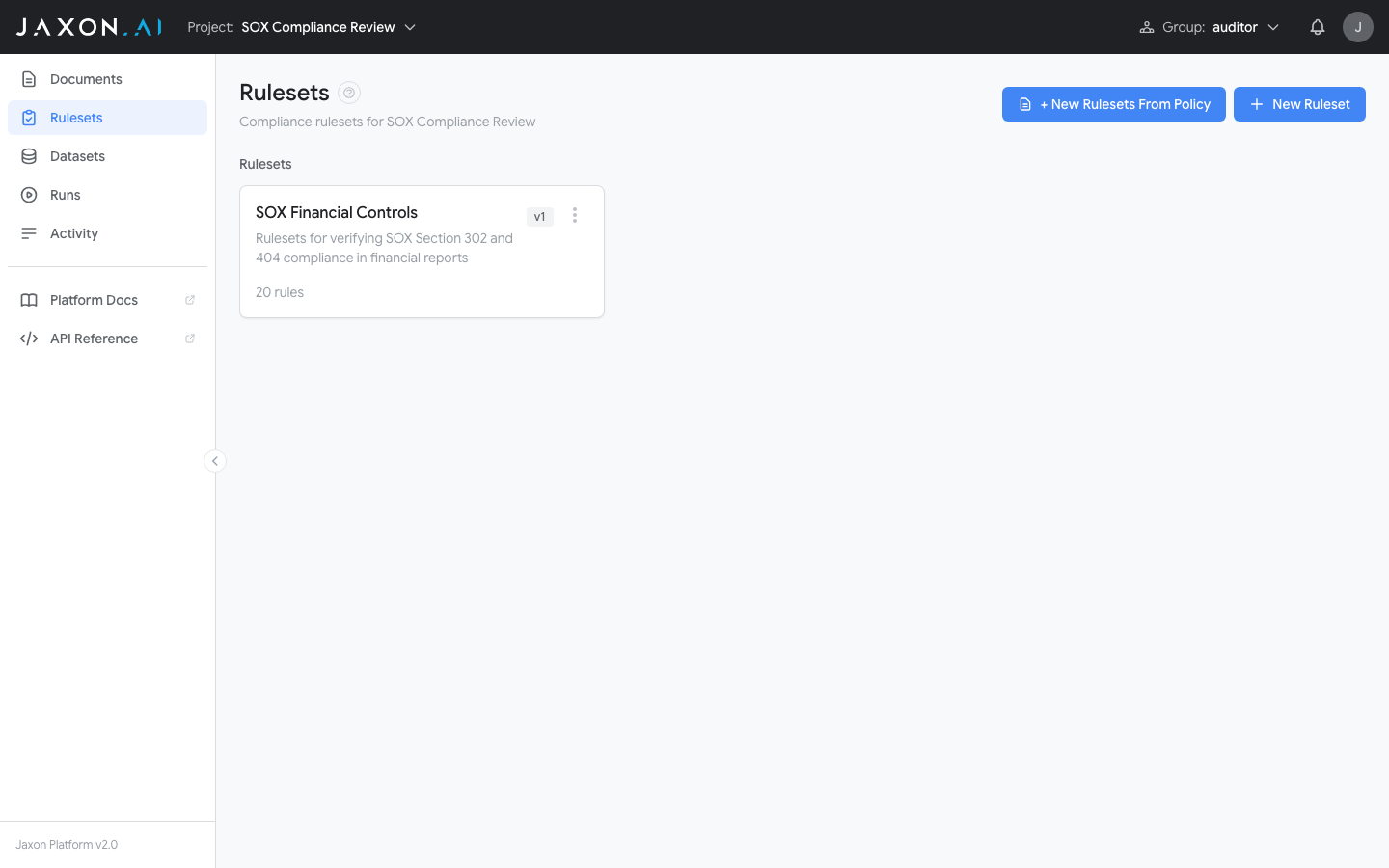
There are two Rulesets views. The project Rulesets page (inside a project) lists that project's rulesets with their names and rule counts. From here you can create new rulesets or open existing ones for editing.
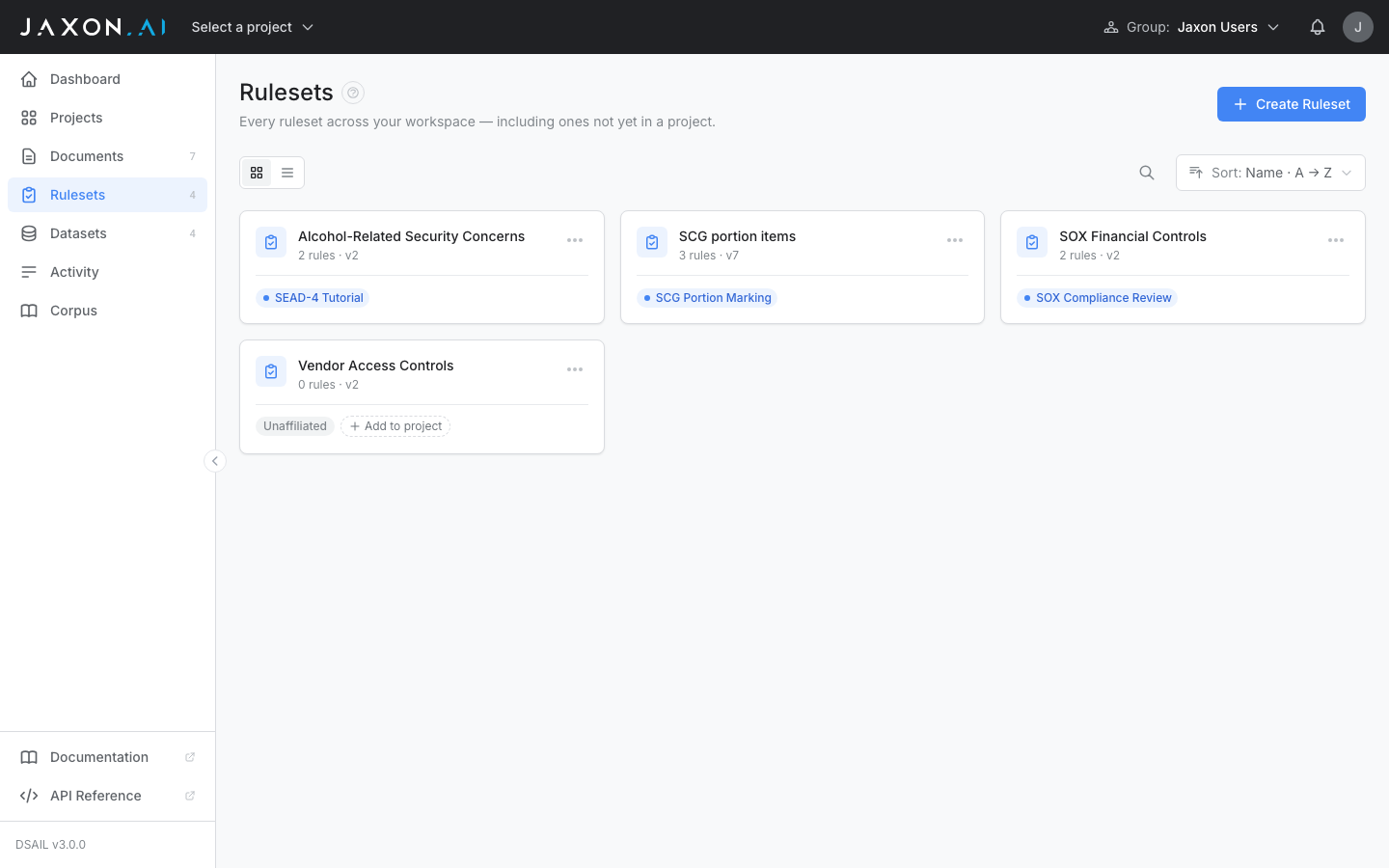
The workspace-level Rulesets page lists every ruleset across your workspace, including unaffiliated rulesets that aren't in any project yet.
Rulesets and Projects
A ruleset belongs to at most one project. Rulesets created from the workspace Rulesets page start unaffiliated; you can add one to a project with the row's Add to project control, or remove it again with the × on its project chip.
Editing follows the association: an unaffiliated ruleset is fully editable from the workspace-level Ruleset Studio, including testing rules against manual input. Once a ruleset is added to a project, it is editable only from within that project — opened at the workspace level it is read-only. To reuse a ruleset elsewhere, Duplicate it (the copy includes the rules and policy-document links, and can target any project or none).
Click Create Ruleset to open the creation wizard. The wizard walks you through two paths:
- From Policy Documents — A 5-step wizard that extracts rules from a policy document automatically
- Empty Ruleset — A shorter path (Details, Type, Models) that creates a blank ruleset immediately; you then add rules manually in the Ruleset Studio
The Creation Wizard (From Policy Documents)
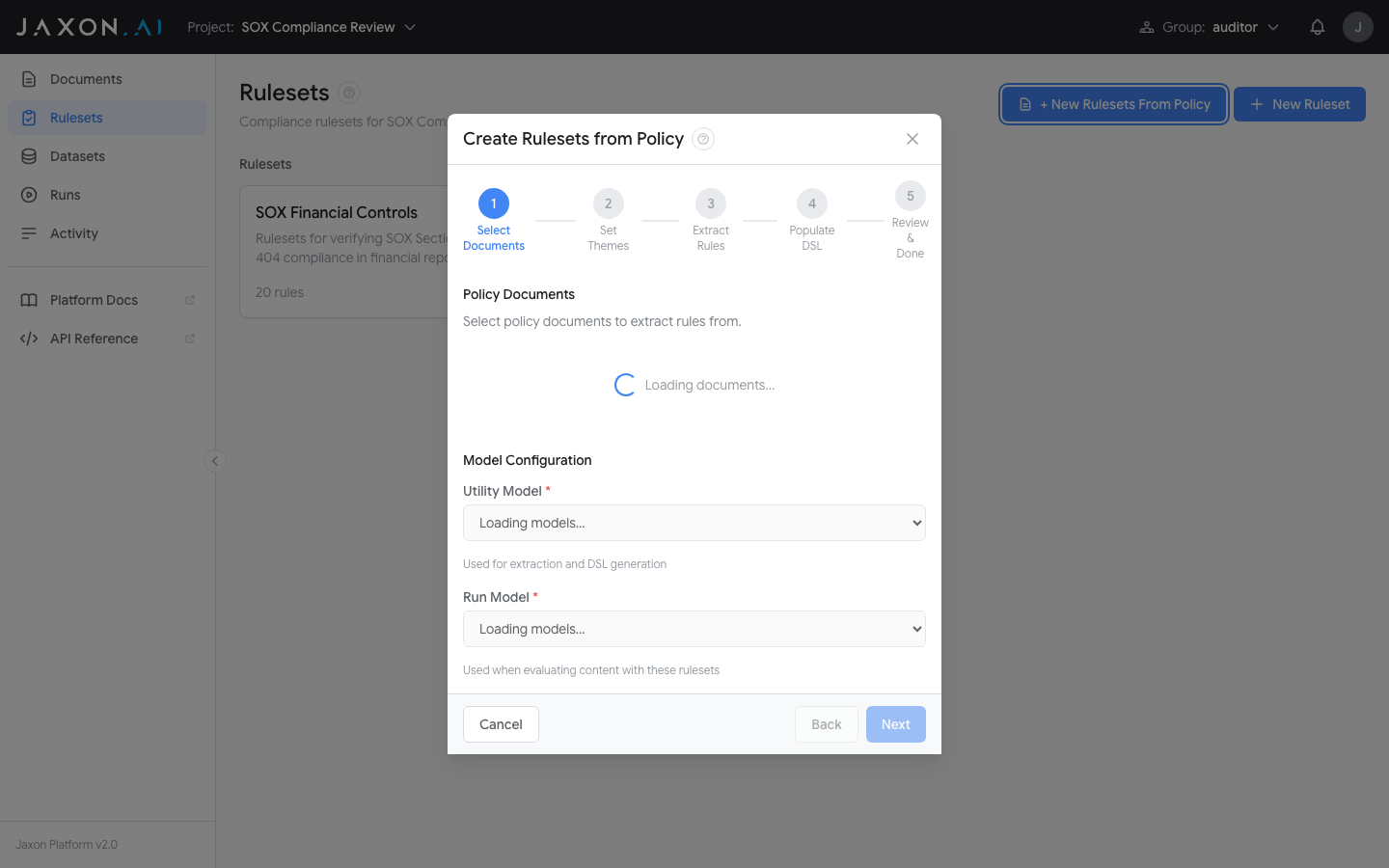
When you select From Policy Documents in the Type step, the wizard walks you through five steps:
Step 1 — Details: Enter a name and optional description for the ruleset.
Step 2 — Type: Choose From Policy Documents to extract rules from an existing document, or Empty Ruleset to start from scratch.
Step 3 — Models: Select the Inference Model (used when evaluating content with the ruleset) and the Configuration Model (used for extraction and DSAIL generation).
Step 4 — Select Documents: Choose one or more policy documents from your project to extract rules from.
Step 5 — Create Rules & DSAIL: Choose an extraction method. For Basic and RAG, also define a theme to guide extraction (a title plus optional context; click Suggest to auto-generate one from the selected documents). Click Start to extract rules; the platform then generates DSAIL code and data extraction questions for each extracted rule automatically, and when generation completes the wizard opens the finished ruleset directly in the Ruleset Studio. Both stages can run in the background.
The Ruleset Studio
After creating a ruleset (or when opening an existing one), you enter the Ruleset Studio — the primary workspace for viewing and editing individual rules.
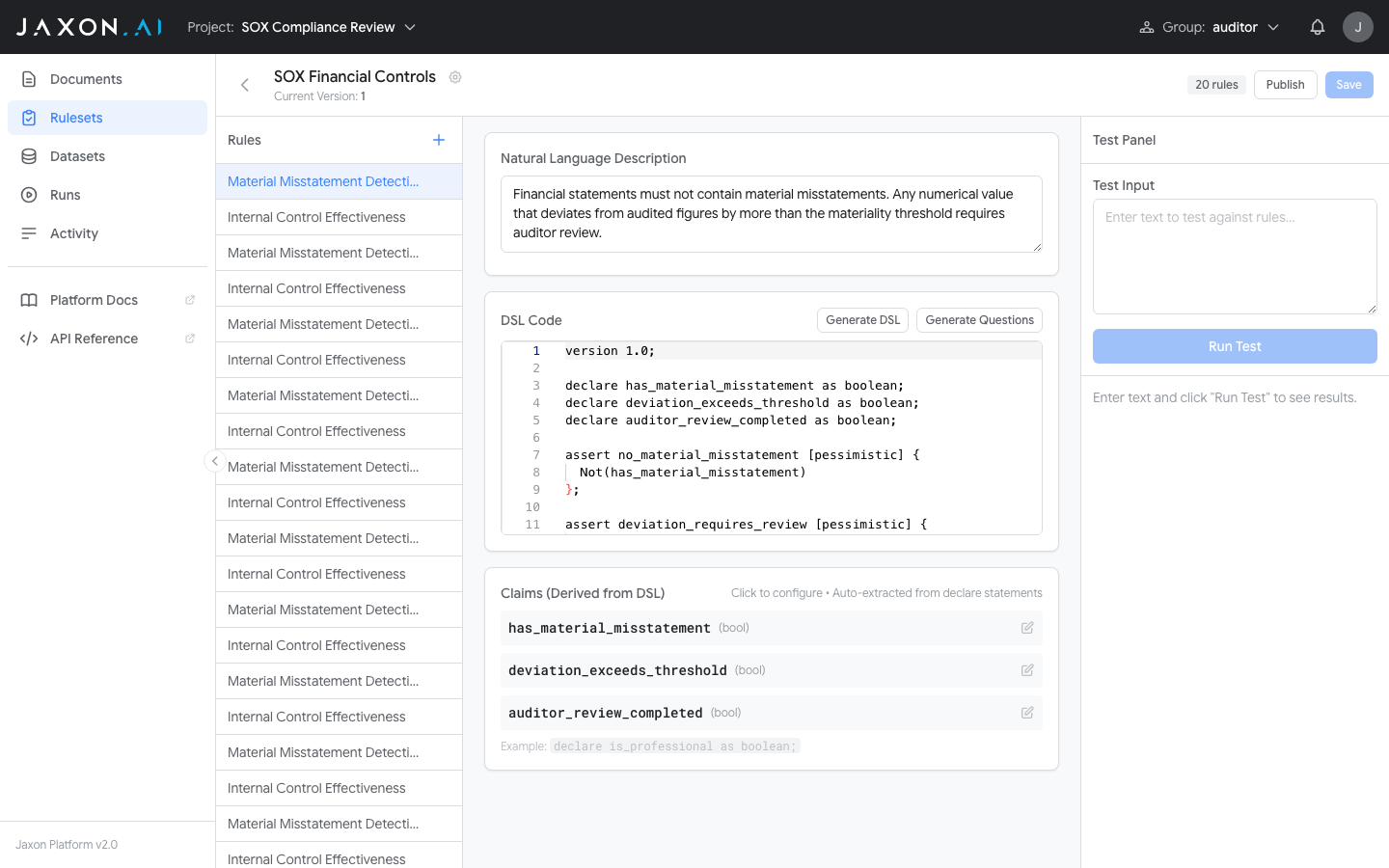
The Studio has a three-panel layout:
- Rule list on the left — Navigate between rules in the ruleset. Click the "+" button to add new rules.
- Rule editor in the center — Edit the natural language description and DSAIL code for the selected rule. Use Generate All (or Regenerate All once DSAIL exists) to generate DSAIL from the description and then the claim questions, in one chained action. Claims are derived automatically from
declarestatements in the DSAIL code, and when you save a rule any claim still missing an extraction question has one generated for it automatically (you can edit any question by hand). Any claim declared without the@sigil is private to its rule; Promote to vocabulary in the claim editor registers it in the shared registry — see Promoting a local claim.
DSAIL generation is seeded with the claim registry in scope, and prefers it: where a registry claim already expresses a fact the rule needs, the generated code declares and references that claim by its @namespace.name, and a bare local claim is invented only where nothing in the registry fits. This applies to both generation paths — the ruleset creation wizard and Generate All on a rule written by hand — so a ruleset is written against the shared vocabulary from its first draft rather than accumulating a parallel one that has to be reconciled later.
- Test panel on the right — Enter test input text, click "Run Test", and see per-assertion results (TRUE/FALSE) and claim answers immediately. Multi-slot rulesets show one text area per declared input slot.
You can publish new versions, revert changes, and save your work from the header bar.
Marking: a solved verdict alongside the per-rule verdicts
Two settings turn a ruleset from a set of independent rules into one that also reports a mark — a solved level on an ordered corpus claim, such as a classification level or a risk band.
Mark target, in the ruleset's Edit dialog, is the opt-in. The picker offers the ordered registry claims — the same population the corpus rule editor offers as a target — and its first option is No mark — evaluate per rule only, which is where every existing ruleset sits. Leave it unset and the ruleset evaluates exactly as it always has: one program per rule, one verdict per rule, nothing added. Set it and every run additionally solves the level the rules force, and returns it as ordinary assert results beside the per-rule verdicts. Choosing a claim pins the version shown, so a mark is never solved against a scale that moved underneath it.
Governed by declares the corpus rulesets whose axioms and precedence apply to this ruleset's rules — what a run resolves its marking slice from, and what Analysis uses instead of inferring a slice from the claims a run happened to answer. The ids are unversioned: each names every version of that corpus ruleset.
Both are properties of the ruleset version, because a finished run's semantics must read as they were when it executed: retargeting a mark or changing the governing slice is a semantic change, so it makes a new version rather than editing one in place. An existing version shows the target it marks and the slice it declares; changing either mints a new version rather than editing the one that ran.
Two consequences worth knowing before you set a Mark target:
- Publishing goes through the corpus. A marking ruleset's publish is gated on clean verification for the corpus rulesets it names — see the publish gate.
- The mark is solved fail-safe. A claim a run left Unknown is resolved to the worst case, so an unknown can raise a mark and never lower it. The mark has the full contract, including what a contradicted and an undetermined mark mean.
Input Slots
Every ruleset declares one or more input slots — named positions in the input contract that documents fill at evaluation time. New rulesets default to a single slot called input, which behaves identically to a one-document ruleset; that's what you want for most cases.
Multi-slot rulesets are useful when claims need to reference different documents — for example, a compliance check that compares a contract against an amendment, or a procurement check that pulls fields from both a quote and a purchase_order. Each claim is bound to a single slot via the Input Slot dropdown in the claim editor; the claim's question is asked against that slot's document only.
Manage the slot list in the ruleset's Edit dialog:
- Add a slot by giving it a non-empty unique name.
- Reorder slots; the first slot is the default for newly created claims.
- Remove a slot at any time. Any claims still bound to it are automatically reassigned to the first (default) slot in the new version, so removal never fails. You cannot remove the last remaining slot — a ruleset always has at least one.
The shape of an interactive run's request reflects the declared slots:
{
  "ruleset_id": "...",
  "input_documents": {
    "contract":  {"document": "<contract text>"},
    "amendment": {"document": "<amendment text>"}
  }
}
Single-slot rulesets use the same shape with one key: {"input": {"document": "..."}}.
The keys must be exactly the declared slots — no more, no fewer. A request that misses one, or invents one, is refused with 400 naming both halves of the problem, so a typo reads as a typo rather than as a missing document:
input_documents keys must equal the ruleset's declared input_slots;
missing slots: ['submission']; unknown slots: ['submision']
One claim sees one slot
A claim's question is asked against its own slot's document and nothing else. That isolation is the point of slots — it is what stops a claim about the amendment being answered from the contract — but it has a consequence worth knowing before you meet it:
A claim that needs facts from two slots cannot be answered in either
Bind "does the submission request an amount above the stated cap?" to submission and the extractor never sees the cap, which lives in policy. Bind it to policy and it never sees the amount. Either way the honest answer is Unknown, and you get one.
Split it instead: one claim per slot for the facts each document holds — @cap_amount against policy, @requested_amount against submission — and let the rule do the comparing. Comparison is what the DSAIL assertion is for; the extractor's job is to read one document.
The same rule applies to a claim promoted into the corpus registry: the registry holds one question per claim, and which slot it is asked against is a property of the rule that uses it, not of the claim. The same registry claim can be bound to contract in one rule and amendment in another — two documents, so two answers, which is one of the cases one claim, one answer deliberately does not fold together.
Auditing what each slot held
A run's results carry slot_texts — {slot_name: text}, the text each slot-bound claim was actually asked against — on any run whose slot text arrived inline, which is every interactive run. That is what makes slot isolation checkable rather than a promise: a claim that answered Unknown because its own slot lacked the fact looks exactly like an extraction failure until you can see what the slot held.
A batch run over a dataset carries slot_documents instead — the document id and name per slot — because there the activities fetch each slot's text from the database rather than carrying it with the run, which keeps document content out of the workflow payload. The audit is the same one, reached through the document rather than inline.
The run record's input_text is not that audit. It is a flattened transcript kept so listings have something to show, and on a multi-slot run it is the slots concatenated behind --- slot --- labels — readable, but a single string, and no substitute for the per-slot map when the question is which document a claim actually saw.
The DSAIL Editor
The Studio includes a dedicated code editor for writing and editing DSAIL assertions.
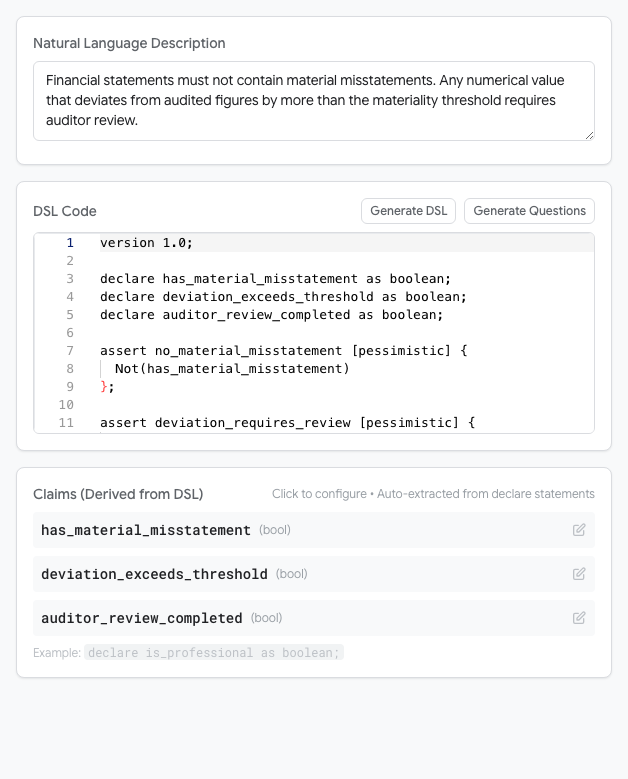
The editor supports the full DSAIL Language syntax including variable declarations, assertions with completion policies, functions, and quantifiers.
Deleting Rulesets
Rulesets can be deleted one at a time from a row's menu, or several at once. Bulk selection works on both the project and the workspace Rulesets page, but only in list view — switch away from card view to see the checkboxes — and only if your active group has write access.
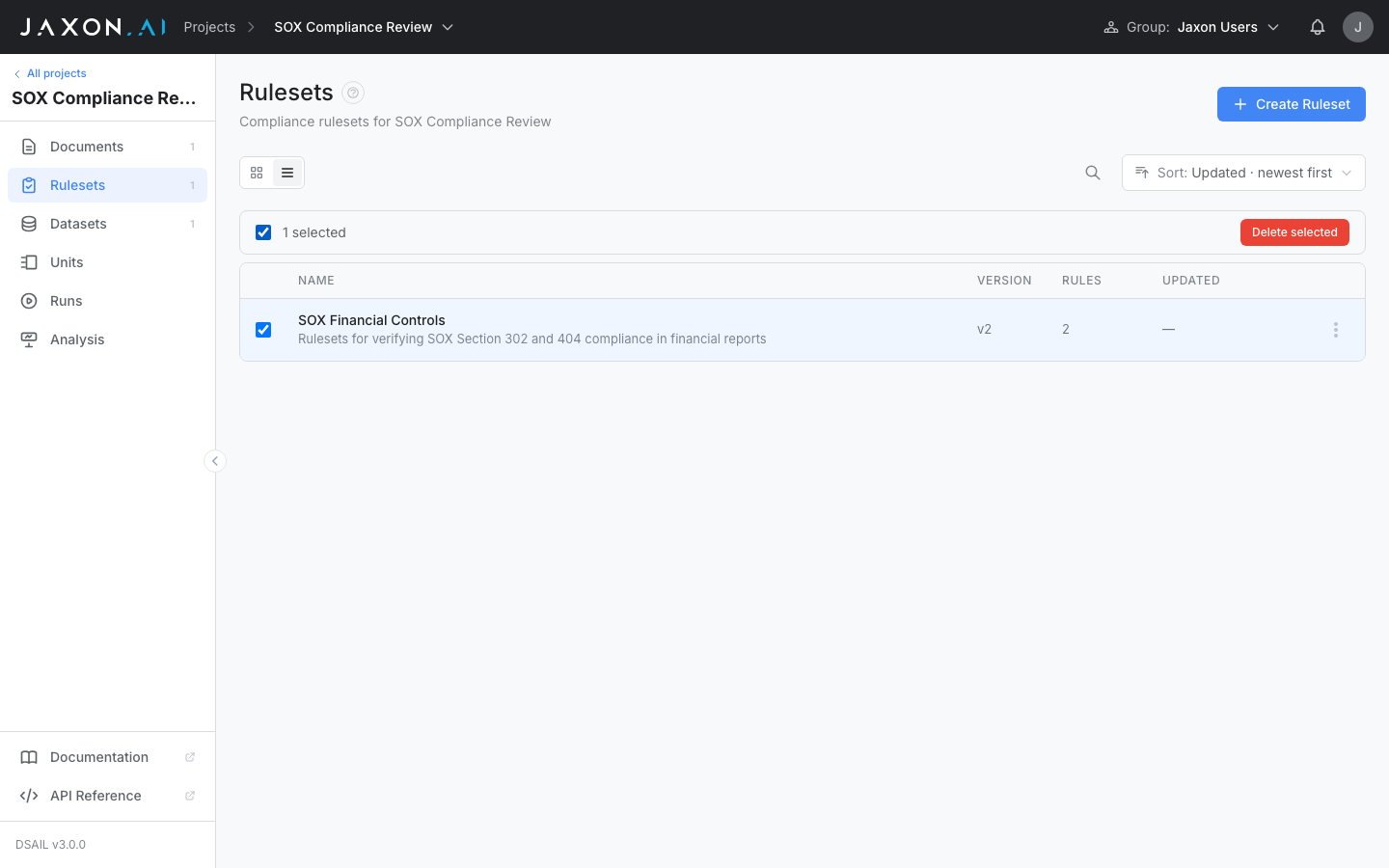
Select one or more rulesets and click Delete selected. The confirmation dialog lists the rulesets by name, notes how many rules will go with them, and requires you to type delete before the button activates.
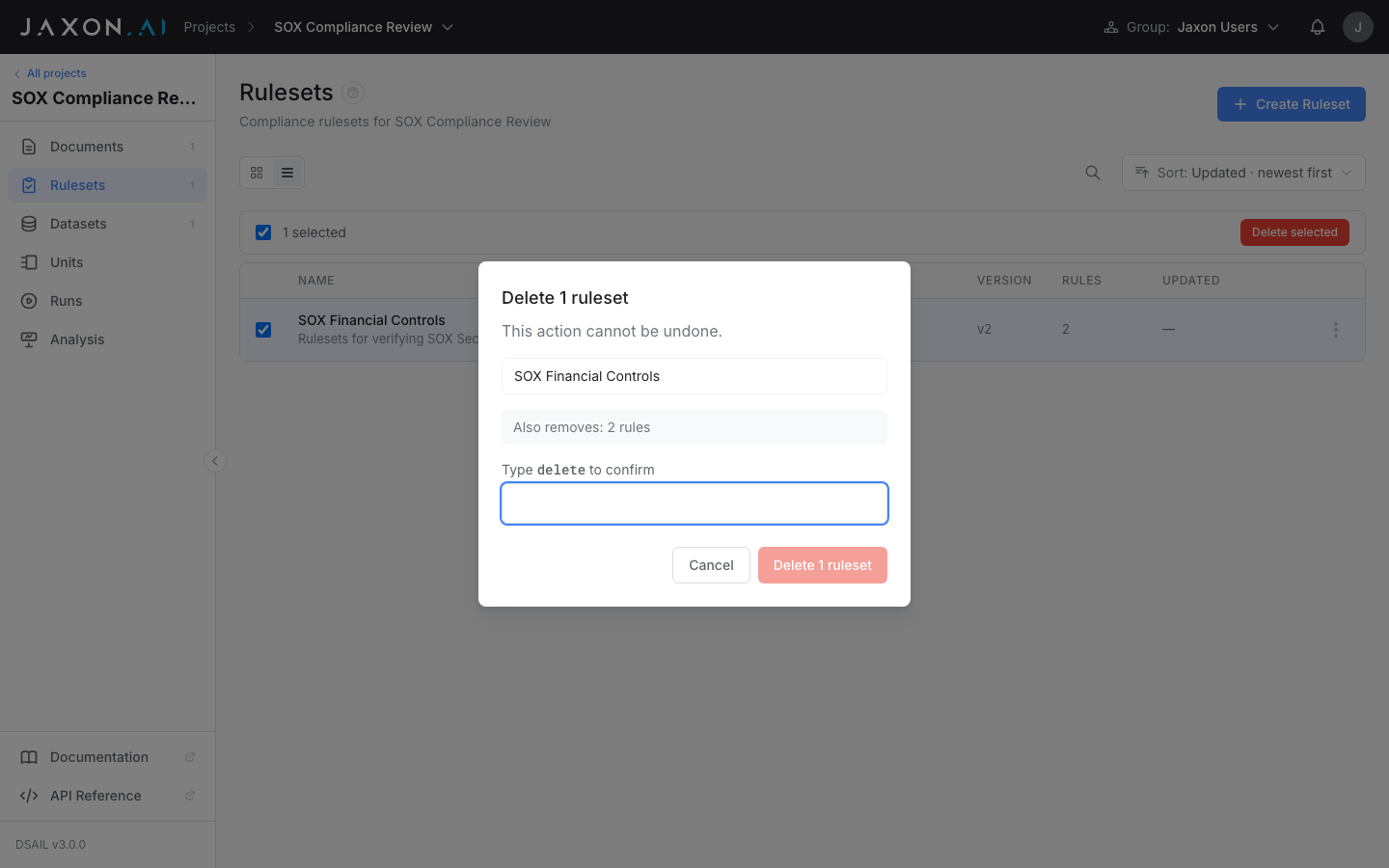
A ruleset that is referenced by an active or pending run can't be deleted. Because deletion is all-or-nothing, one blocked ruleset stops the whole batch: instead of deleting anything, the dialog switches to a "Can't delete these rulesets" panel naming each blocked ruleset and the reason. Wait for the run to finish, then try again.
Deletion cannot be undone from the interface, and it removes the ruleset for everyone in your group.
Related Concepts
- Documents provide the policy source and input text that rulesets verify
- Datasets group documents for batch testing
- Runs execute rulesets against documents and display compliance results
- DSAIL Language is the formal language used to write rule assertions