DSAIL Language
DSAIL is Jaxon's domain-specific language for expressing policy constraints as formal logic. DSAIL code compiles to SMT solver inputs, enabling mathematically provable compliance checking rather than probabilistic LLM-based assessment. Where an LLM might say "this probably complies," a DSAIL assertion either holds or it does not.
Each ruleset rule contains DSAIL code that declares variables, defines constraints through assertions, and compiles to formulas that an SMT solver evaluates. The solver determines whether each assertion is satisfiable (the constraint holds) or unsatisfiable (the constraint is violated). This satisfiability check maps to a boolean outcome for each assertion, giving a precise, per-rule compliance verdict for every input document tested.
How DSAIL Works
DSAIL bridges the gap between natural language policies and formal verification. Here is how it fits into the ruleset workflow:
- A policy rule is expressed in natural language -- for example, "The proposed rent must not exceed 110% of local market average"
- DSAIL code formalizes that rule -- declaring variables like
landlordStatedProposedRentandlocalMarketAverageRent, then asserting the constraintlandlordStatedProposedRent <= (localMarketAverageRent * 1.1) - Questions are generated for each variable -- at run time, an LLM reads the document and answers questions like "What is the proposed rent?"
- Answers become variable assignments -- the LLM's answers are bound to the declared variables
- The solver evaluates the assertion -- given the variable values, is the constraint satisfied?
This approach separates two concerns: the LLM handles data extraction (answering straightforward factual questions about document content), while the SMT solver handles logical reasoning (determining whether the extracted facts satisfy the formal constraint). The result is more reliable than asking an LLM to reason about compliance directly.
For Compliance Teams
While it is a good idea to audit DSAIL logic to ensure that it aligns with policy expectations, it is not necessary to write DSAIL code manually. The platform can generate DSAIL from natural language rules using the ruleset creation wizard. Understanding what DSAIL does -- encoding policy rules as provable logic -- is more important than knowing the syntax. The language reference below is primarily for technical users who want to write or customize rules directly.
Language Reference
DSAIL programs consist of:
- Variable declarations -- Typed variables (boolean, real, integer, symbol).
- Assignments -- Default, constant, or initial values for variables.
- Assertions -- Named logical constraints that the solver evaluates.
- Functions -- Reusable logic encapsulated as named functions.
- Quantifiers -- Universal (
ForAll) and existential (Exists) constraints over collections.
Basic Syntax
- Statements end with a semicolon (
;) unless enclosed in braces. - Block statements use curly braces (
{ ... }). - Identifiers are alphanumeric with underscores (
_).
declare x as boolean;
let x = true;

assert myAssertion {
  x
};
Data Types
DSAIL supports the following types:
- Boolean
- Truth values (
trueorfalse). - Integer
- Whole numbers (e.g.,
0,42,-3). - Real
- Floating-point values (e.g.,
3.14,-0.5). - Symbol
- Fixed string values (e.g.,
"purple"). Used for enumerating values that do not map to numeric or boolean types.
Collections
Arrays are declared with typed keys and typed values, functioning as ordered maps. Each key must be unique.
declare myPrices as array[integer] of real;

let myPrices[0] = 10.99;
let myPrices[1] = 20.50;

assert priceCheck {
  myPrices[0] < myPrices[1]
};
Sets contain collections of typed elements without repetition. They are used with quantifiers and membership checks.
declare tenantIDs as set of integer;

assert allPositiveIDs {
  ForAll(x in tenantIDs, x > 0)
};
Declarations
Use declare to introduce a typed variable. Undeclared variables cannot be used in assertions or assignments.
declare myBool as boolean;
declare myNumber as real;
declare mySymbol as symbol;
An unbound variable (one without an assignment) can unify to any value of its declared type. This is how DSAIL handles variables whose values come from LLM question-answering at run time.
Local Variables
Use declare local to create intermediate variables that are not turned into questions or claims. Local variables are typed and usable in expressions and assertions, but the platform will not ask about them or try to populate them at inference time.
declare local ageThreshold as integer;
let ageThreshold = 18;

declare applicantAge as integer;
assert ageRequirement [pessimistic] { applicantAge >= ageThreshold };
In this example, ageThreshold is a fixed constant used in the assertion -- there is no reason to generate a question for it. applicantAge is a regular declaration, so the platform will generate a question asking for its value.
When to use declare local:
- The variable's value is fully determined by a
letassignment - The variable is an intermediate computation combining other variables
- The variable serves as a named constant and should not generate a claim
When to use regular declare:
- The variable's value comes from user input or document extraction
- The platform should generate a question for this variable
Assignments
Use let to assign a default value to a declared variable. If no assignment is provided, the solver treats the variable as unknown.
let myBool = true;
let myNumber = 42;
let mySymbol = "Large";
Assertions
Each DSAIL assertion corresponds directly to a rule in the platform. The assertion result (TRUE, FALSE, or UNKNOWN) is the rule's evaluation outcome -- a single ruleset rule produces exactly one assertion, and the solver's verdict on that assertion determines whether the rule passes or fails.
Define an assertion with assert <name> { <formula> }:
assert myRule {
  And(myBool, Not(false))
};
Assertion names appear in Runs results and are used as column headers in Datasets ground truth CSVs.
Completion Policies
When unbound variables (those not assigned a value by LLM answers or let statements) prevent the solver from reaching a definitive TRUE or FALSE, the assertion result is UNKNOWN. Completion policies control how an UNKNOWN assertion result is resolved:
- neutral (default)
- The assertion result remains UNKNOWN.
- pessimistic
- An UNKNOWN assertion result is treated as FALSE (violation).
- optimistic
- An UNKNOWN assertion result is treated as TRUE (passing).
Specify a completion policy per assertion using square brackets:
declare age as integer;

// Default (neutral): UNKNOWN result stays UNKNOWN
assert AgeCheck {
  age >= 18
};

// Pessimistic: UNKNOWN result becomes FALSE
assert SafetyCheck [pessimistic] {
  safety_score > 0.8
};

// Optimistic: UNKNOWN result becomes TRUE
assert BestEffortCheck [optimistic] {
  optional_field != ""
};
Logical Operators
DSAIL provides standard logical operators:
| Operator | Description |
|---|---|
And(expr1, expr2, ...) |
True if all expressions are true |
Or(expr1, expr2, ...) |
True if at least one expression is true |
Not(expr) |
Logical negation |
If(cond, then, else) |
Returns then when condition is true, otherwise else. Both branches must be the same type |
assert rule_with_logic {
  And(
    myBool,
    Or(Not(myBool), true)
  )
};

declare isInScope as boolean;
declare requiresFullReview as boolean;
declare requiresPartialReview as boolean;

assert reviewRequired {
  If(isInScope, requiresFullReview, requiresPartialReview)
};
Relational Operators
| Operator | Meaning |
|---|---|
== |
Equality |
!= |
Inequality |
< |
Less than |
> |
Greater than |
<= |
Less than or equal |
>= |
Greater than or equal |
assert numeric_check {
  myNumber <= 100
};

assert equality_check {
  mySymbol == "Apple"
};
Arithmetic
DSAIL supports standard arithmetic on numeric types:
| Operator | Description |
|---|---|
+ |
Addition |
- |
Subtraction |
* |
Multiplication |
/ |
Division (real division only) |
- (unary) |
Negation |
All operations are strictly typed. Mixing incompatible types (e.g., integer and boolean) is not allowed.
declare baseRent as real;
declare surcharge as real;
declare tax as real;
declare totalRent as real;

let baseRent = 1200.0;
let surcharge = 150.0;

let totalRent = (baseRent + surcharge) * tax;

assert rentWithinLimit {
  totalRent <= 1400.0
};
Quantifiers
Quantifiers express constraints over collections or domains:
- ForAll(variable in domain, formula)
- The formula must hold for every element in the domain.
- Exists(variable in domain, formula)
- There is at least one element in the domain for which the formula holds.
declare myInt as integer;

domain intDomain = [1, 2, 3, 4];

assert universal_rule {
  ForAll(x in intDomain, x > 0)
};

assert existential_rule {
  Exists(x in intDomain, x == 2)
};
Functions
Define named functions to encapsulate reusable logic:
function isPositive(value as integer) as boolean {
  value > 0
};

assert checkPositivity {
  isPositive(myInt)
};
The function return type must match the type of the expression in the body. Parameters are scoped to the function.
Complete Example
This example shows a compliance scenario checking Section 8 housing policy:
declare landlordMentionedPreferNoSection8 as boolean;
declare landlordMentionedAdvertisingNoSection8 as boolean;
declare landlordStatedProposedRent as real;
declare localMarketAverageRent as real;

let localMarketAverageRent = 1000.0;

assert fact_mandatory_acceptance [pessimistic] {
  Not(
    Or(
      landlordMentionedPreferNoSection8,
      landlordMentionedAdvertisingNoSection8
    )
  )
};

assert fact_rent_reasonableness [pessimistic] {
  landlordStatedProposedRent <= (localMarketAverageRent * 1.1)
};
In this example:
- Two boolean variables capture whether the landlord expressed refusal of Section 8
- A real variable captures the proposed rent, compared against 110% of market average
- Both assertions use
[pessimistic]completion policy -- if the LLM cannot determine whether the landlord refused Section 8, the assertion fails (safe default for compliance) - The
localMarketAverageRentdefault of 1000.0 can be overridden at run time by external input
The DSAIL Editor
The platform includes a built-in DSAIL editor within Ruleset Studio that provides syntax highlighting and error feedback while writing or modifying code.
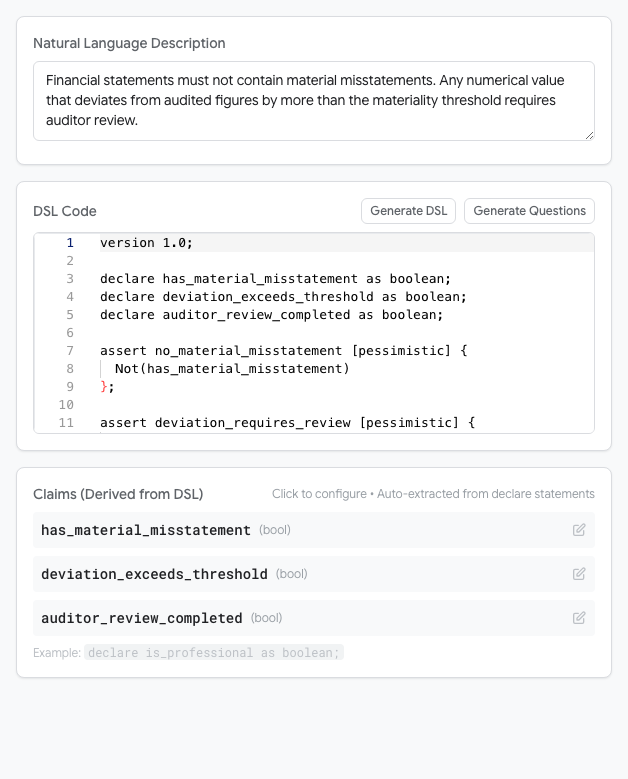
The platform can also generate DSAIL code automatically from natural language rules using the ruleset creation wizard. Generated code can be reviewed and manually edited in the editor.